What That Bright Spot Actually Means (And Why You Should Care)
Seeing a bright spot on your phone screen for the first time stops most people cold. That moment of dread wondering what it means, how bad it is, whether the phone is done is something I’ve watched play out in my repair shop more times than I can count.
Here’s the truth: it’s not automatically the end of your phone. But it’s also not the kind of thing you shrug off and check on later.
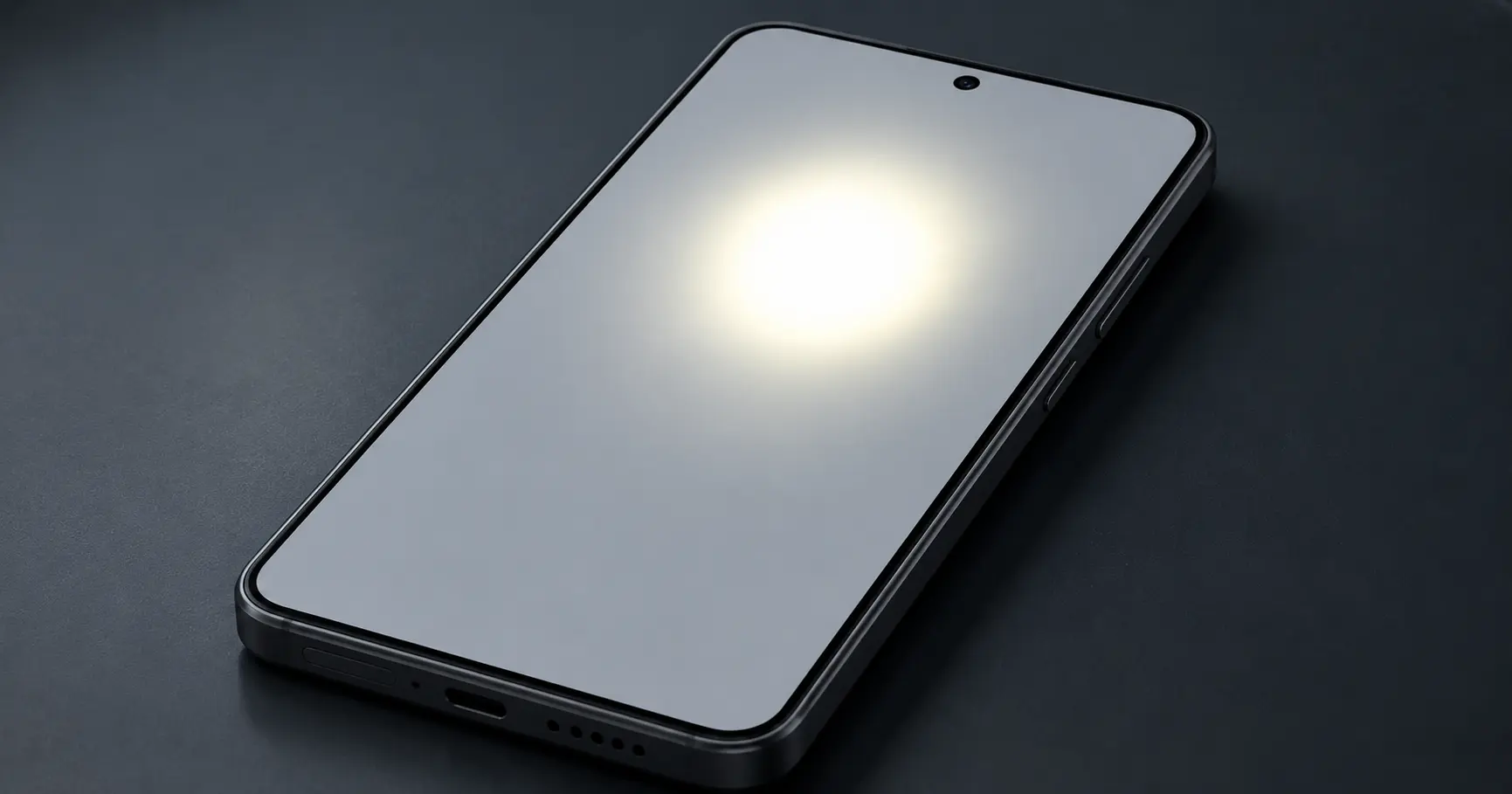
A bright spot on your phone screen is a patch where light pushes through the display differently than the surrounding area brighter, whiter, or just visually wrong.
People often call it a white spot on phone screen, and while the two look nearly identical, the cause behind each one points you toward completely different fixes.
After working on well over a hundred phones with this exact problem, I can tell you that the bright dot on phone displays almost always traces back to one of three things: surface pressure that shifted or compressed the internal screen layers, a stuck pixel locking onto the wrong color, or direct hardware damage to the display panel itself.
Timing tells me more than almost anything else about what caused the problem. A bright spot that appeared right after a drop or a repair points directly at physical damage.
One that showed up randomly on a phone you’ve owned for a year without incident suggests something different entirely. What most people don’t know about second hand phones: in roughly 90% of the cases I’ve handled, the top protective glass had been cheaply replaced at some point, but the matrix layer underneath was already permanently compromised.
That bright spot didn’t appear out of nowhere. It was there before you bought the phone the cheaper glass swap just made it visible
Bright Spot vs White Spot vs Dead Pixel
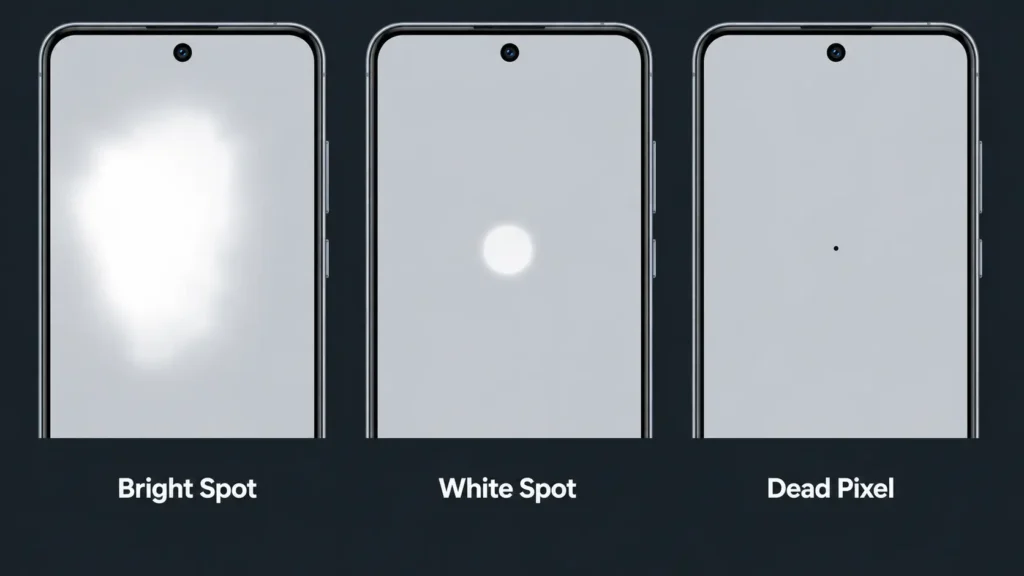
Knowing which of the three you’re actually dealing with changes everything the fix, the cost, and whether there is a fix at all. A bright spot is typically a larger patch, noticeably brighter than the screen around it, most obvious against white or pale backgrounds.
Pressure damage and backlight issues are the usual culprits. A white spot on phone screen is more contained a defined area that looks washed out or milky rather than just bright.
These occasionally respond to surface-level fixes, but only when the cause is adhesive or debris between layers rather than actual panel damage. The dead pixel vs bright spot distinction trips people up constantly.
Dead pixels are single dots stuck black, stuck white, or stuck on one wrong color. Bright spots are wider, covering multiple pixels at once, and the cause runs deeper than a single point of failure.
OLED and modern LED panels don’t forgive physical damage. No app, no restart sequence, no pixel cycling tool fixes a display where the physical layer has already failed. The pixels are gone.
Replacement is the only path forward. That said, before spending money on anything, the first job is figuring out exactly which type of damage you have because the diagnosis changes the decision entirely
But before you give up, let me show you how to figure out exactly what type you’re dealing with.
First Thing to Do: Is Your Phone in Danger Right Now?
Before anything else, check what kind of screen your phone uses. This matters more than most guides will tell you. A lot of people look at a bright spot and assume it’s cosmetic annoying but harmless.
Sometimes that’s true. But on certain screen types, what looks like a small visual glitch today can turn into a growing dead zone within two weeks. That’s not a worst case scenario. I’ve watched it happen.
Screen technology is the first variable that determines how fast you need to move. OLED and AMOLED displays can develop what the repair community calls OLED rot — a cascade failure where one patch of degraded organic pixels triggers damage in the surrounding area. It doesn’t always spread fast. But when it does, it moves faster than most people expect.
I’ve seen phones go from a tiny bright spot to a completely black screen in less than two weeks. That’s not scare tactics. That’s what happens when organic pixels start failing and the damage cascades to surrounding areas.
Battery swelling is a separate problem, and a more serious one. When the battery expands and presses against the display from inside, the screen damage is almost secondary.
A swollen lithium battery can rupture, overheat, or in rare cases catch fire. The bright spot on the display is just the visible symptom of something happening inside the phone that needs attention fast.
Here’s what you need to check immediately.
If You Have OLED/AMOLED: Back Up Your Data Now
Samsung Galaxy devices, iPhone X and newer models, OnePlus phones, and most current flagship Android handsets all run on OLED or AMOLED panels. If your bright spot is on any of those, the timeline matters.
OLED screen burn in and pixel degradation follow a predictable path: one compromised area quietly pulls surrounding pixels into failure.
What starts as a small bright patch today can become a spreading dark zone covering a third or half the display within weeks.
I learned this the hard way when a client ignored a small bright spot on their Samsung Galaxy for three weeks. When they finally brought it to me, the entire left side of the screen had gone completely black.
Once OLED rot gets past a certain threshold, you lose the ability to navigate your own phone. The working area keeps shrinking sometimes down to a strip along one edge and at that point you can’t access settings, can’t connect to a computer, can’t transfer anything.
If your screen becomes completely unresponsive, my guide on extracting photos from a damaged Android phone shows several methods to recover your data even when the display isn’t working
Go to your phone settings right now and start a cloud backup before that window closes. I’ve had customers come to me unable to back up two years of photos because they waited three days too long.
Do this right now if you haven’t already. Go to your phone settings and start a full backup to the cloud. Don’t wait until tomorrow.
Check for Battery Swelling (This Could Be Dangerous)
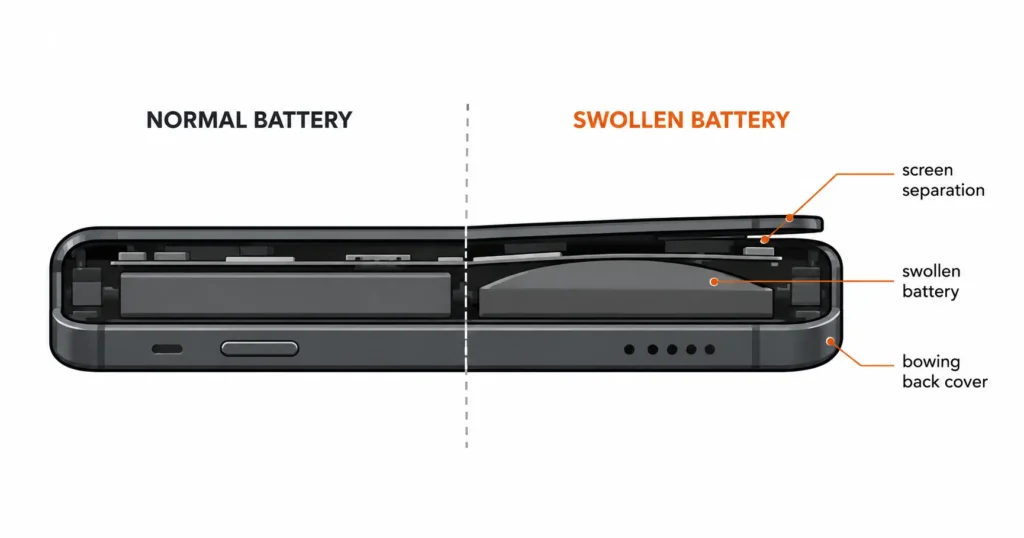
Battery swelling screen damage shows up more often than people expect, especially in phones two years old or older and most owners have no idea it’s happening until the screen starts showing problems. Check your phone from the side right now.
Does the back cover push outward slightly? Does the screen ride higher than the frame along any edge? Try setting it flat on a table. If it rocks, the battery has already expanded enough to bow the chassis.
Any of these signs mean your battery has expanded and is physically pushing against your screen from the inside. This creates pressure points that show up as bright spots or distorted areas on the display.
The screen damage is actually the least of it.
A swollen battery can rupture under pressure, overheat without warning, or drop from full charge to dead in minutes. If you’re experiencing charging issues alongside the bright spot, check out my detailed guide on why phones stop charging and how to fix it
I once pulled a battery out of a phone case that had expanded to nearly twice its original thickness the owner thought the back cover had just warped, had no idea the screen starting to lift away from the frame was the battery pushing outward from inside
If you suspect battery swelling, stop using the phone for charging overnight and get it checked by a repair technician within the next few days.
Quick 2-Minute Test: Software Problem or Hardware Damage?
The fastest way to figure out how to test if phone screen is damaged versus showing a software glitch is a ten-second screenshot. That’s it. Most people assume any bright spot is hardware failure, and I understand why — it looks like damage. But I’ve diagnosed software overlays, stuck proximity sensor indicators, and frozen notification dots that were visually identical to screen damage and disappeared completely after one restart. The screenshot tells you which one you’re actually dealing with
Panic and money spent on the wrong fix are the two most common outcomes when people skip the diagnostic step. My sequence is: screenshot test first, software troubleshooting only if the screenshot result points that direction, professional check if neither resolves it.
Two minutes of testing saves a lot of people from an unnecessary $200 repair quote.
If these quick checks don’t solve the problem, you’re probably dealing with a phone screen hardware fault that needs professional attention. But at least you’ll know for certain instead of guessing.
The Screenshot Test (Takes 10 Seconds)
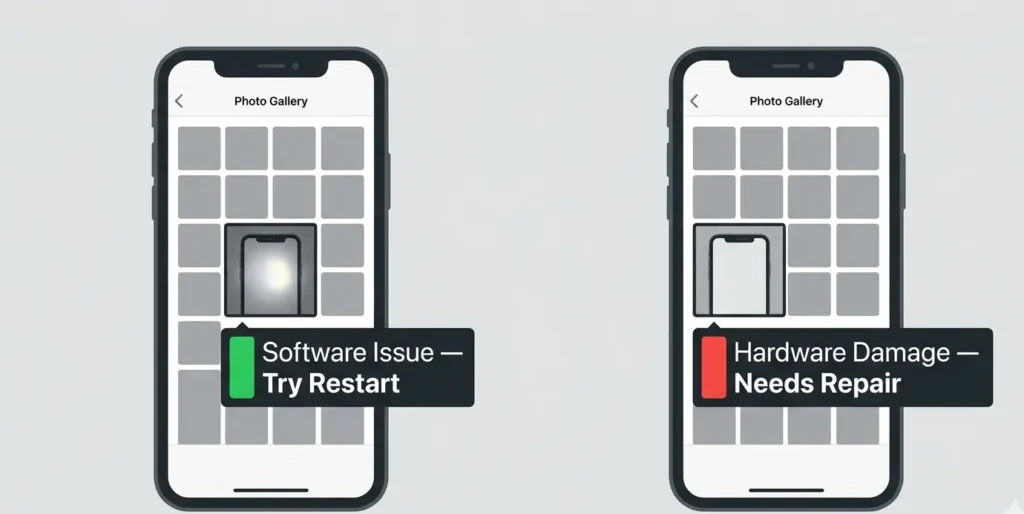
Take a screenshot while the bright spot is clearly visible on your screen. Look at that screenshot in your photo gallery.
If the bright spot appears in the screenshot, it’s a software issue. The spot is being generated by an app, system overlay, or notification that got stuck on screen.
If the bright spot does not appear in the screenshot, the problem is physical screen damage. The phone display hardware problem exists in the actual screen layers, not in what the phone is trying to display.
Screenshots capture what the phone is sending to the display, not what the physical panel looks like.
That’s why this works. If the spot shows up in the screenshot, the hardware is fine something in the software stack is generating it. Restart the phone. Check if any accessibility features, notification overlays, or recently installed apps are running display modifications.
In my experience, a restart alone clears the majority of software generated bright spots. If the spot doesn’t appear in the screenshot, you’re dealing with the display panel itself and the software route won’t help you.
What Actually Causes Bright Spots to Appear on Phone Screens
When someone walks into my shop with a bright spot, pressure damage is the first thing I check — and it’s the right call about 80% of the time. There are six categories of causes I work through, but the first three cover the vast majority of cases: pressure damage, backlight problems on LCD screens, and repair shop installation errors.
Pressure from something pushing against the display layers. Problems with the backlight bleeding through in LCD screens. Or mistakes made during a previous screen repair.
The rest are less common but just as frustrating. Water damage that affects how the display layers work together. Battery swelling that pushes against the screen from inside. And occasionally, manufacturing defects that only show up months after you buy the phone.
What catches most people off guard is timing. That bright spot didn’t necessarily happen when you think it did. Pressure damage can take weeks to become visible. A repair shop mistake might not show up until the adhesive fully sets. And water damage sometimes creates delayed effects that appear long after the phone dried out.
The cause determines everything about whether you can fix it and how much that’s going to cost you.
Pressure Damage (What 80% of Users Actually Have)
This happens when something presses against your phone screen hard enough to compress or shift the internal display layers.
Pressure damage creates the classic bright spot that most people describe. Usually appears as a patch that’s noticeably brighter than the surrounding screen, especially visible on white or light backgrounds.
Tight front pockets, phones left under laptops, phones slept on in bed — I deal with the results of all three regularly. People always assume the pressure had to be dramatic.
It doesn’t. Sleeping on a phone with a thin OLED panel can compress the internal layers enough to cause a pressure spot by morning. The other thing that catches people off guard: the damage rarely appears immediately.
You might have done the damage four days ago and only see the bright spot this morning. That delay is why people often genuinely can’t trace what caused it
The internal layers slowly separate or shift position over time, which is why people often can’t remember what caused the damage.
Phone screen pressure spot fix options depend on how severe the damage is, but most pressure spots are permanent once they become visible.
LCD Backlight Layer Damage
LCD screens work by shining a backlight through several layers each layer filtering and directing that light to form the image. When one of those layers gets damaged or shifts out of alignment, the filtering breaks down.
LCD backlight bleed is the result: patches of uncontrolled brightness that become most obvious when the screen is showing dark content, because that’s when the blocking layers are doing the most work and the failure becomes visible.
This type of damage usually comes from physical impact or manufacturing defects. I’ve seen it happen when phones get dropped just right to jar the internal components without cracking the outer glass.
The backlight layer itself rarely fails. It’s almost always the LCD layer above that gets damaged and stops filtering the light correctly.
Trapped Debris During Screen Repair (Repair Shop Mistake)
Trapped debris and mismatched screws are the most preventable causes I deal with and also somehow the most common ones coming out of repair shops.
Even a fragment of leftover waterproof adhesive stuck to the frame creates an uneven surface that presses into the display layers once the phone is sealed back up. Repair shops mix up screws, leave old adhesive stuck to the frame, or don’t clean debris properly before installing a new screen.
A bent or warped phone frame is the one repair mistake that almost no one checks before installing a new screen.
When you press a flat display into a frame that’s even slightly twisted, the panel flexes to conform to that shape. That stress registers immediately as bright spots across the display. The frame gets ignored because it looks fine from the outside but the tolerance on modern displays is tight enough that a bend you can barely see is enough to damage the new screen within hours.
A bent or damaged phone frame creates severe uneven tension when you try to install a flat new screen. The display gets twisted slightly to fit the warped frame, and that stress immediately shows up as bright spots across the panel.
Most post-repair bright spots trace back to one of these installation mistakes.
Water Damage Creating Display Issues
Water damage to the screen doesn’t require a full submersion. Humidity, steam, or even condensation getting between the display layers can permanently change how light moves through them.
What makes moisture damage particularly frustrating is the delay the bright spot or discoloration doesn’t always appear right after exposure.
Moisture works its way through the device slowly and symptoms sometimes show up weeks after the phone was ever near water. By then, most people have forgotten the connection entirely
Phone screen physical damage from water usually appears gradually as the moisture moves through the device and affects different components over time. That’s why water damage sometimes creates delayed symptoms that seem to appear randomly weeks later.
How to Fix a Bright Spot on Your Phone Screen (Step-by-Step)
Most bright spot fixes don’t work. That’s the honest starting point. Whether yours can be fixed depends entirely on what caused it software glitches respond to troubleshooting, some stuck pixels respond to color cycling tools, and physical screen damage almost never responds to anything short of screen replacement.
I’m going to walk through three methods in order of safety and realistic success rate. Start at the top. Only move to the next one if the first doesn’t help
I’m going to show you three methods in order of safety and realistic success chances. Start with the safest option that has the lowest chance of making things worse, then work your way through the list only if the previous method doesn’t help.
If the bright spot showed up after a drop, water exposure, or a repair shop visit, the software methods probably won’t help. But try them anyway. They take minutes. If nothing else, you’ll know for certain that the problem is physical before spending money on a repair quote.
The third method involves a professional diagnostic technique that most people never see. It won’t fix the bright spot, but it will tell you definitively whether the problem is fixable or not.
Method 1: Try the JScreenFix Tool (Works for Stuck Pixels)
JScreenFix is worth trying if and only if the screenshot test showed no bright spot in the captured image. That result means the issue is at the software or pixel level, not physical panel damage.
Go to jscreenfix.com, hit Launch JScreenFix, and a small square of rapidly flashing multicolored noise will appear.
Drag it directly over the bright spot. Resize it with two fingers until it covers the affected area completely. Run it for at least 10 minutes some stuck pixels need closer to 30
Drag that flashing square directly over your bright spot. Use two fingers to resize the square so it covers the affected area completely. Let the tool run for at least 10 minutes, but some stuck pixel fix attempts need 30 minutes or more to show results.
The color cycling is designed to unstick pixels that are frozen in one position. If your bright spot is caused by a true stuck pixel, you might see it flicker or change during the process.
The success rate for true stuck pixels is around 30% in my experience. Not high. But it’s free, it takes 10 minutes, and there’s no risk of making anything worse. That combination makes it worth trying before spending anything on professional repair.
Success rate for actual stuck pixels is maybe 30%. Worth trying because it’s free and can’t damage anything.
Method 2: iOS/Android Software Troubleshooting
Software updates can refresh display drivers and clear system-level glitches that sometimes look like screen damage.
For iPhones, go to Settings, General, then Software Update. Download and install any available updates, then restart your phone completely by holding the volume up and power buttons until the Apple logo appears.
Android users should check Settings, System Update or Software Update depending on your phone model. After updating, power off your phone for 30 seconds, then turn it back on.
I’ve seen this clear bright spots that were actually notification overlays or accessibility features that got stuck on screen. The phone display hardware problem was really a software display problem.
Reset your display settings to default if the update and restart don’t help. This clears any brightness or color adjustments that might be creating the appearance of a bright spot.
The success rate here is low for true hardware damage, but high for software-related issues.
Method 3: What Repair Shops Do (The Rubber Band Test)
This professional technique doesn’t fix the bright spot, but it confirms whether the damage is fixable before you spend money on phone screen repair.
Remove your phone case and screen protector. Wrap rubber bands tightly around your phone to simulate the pressure that would exist if the screen were properly glued and sealed.
Turn on your phone and look at the bright spot. If the spot gets worse or more pronounced under the rubber band pressure, the screen damage goes deeper than the surface and replacement is your only option.
If the bright spot stays the same or actually improves slightly, there’s a small chance that professional repair could help by properly reseating the display layers.
This test saved me from doing unnecessary repair work countless times. Most people skip straight to expensive fixes without confirming the damage can actually be repaired.
My Screen Was Just Repaired and Now There’s a Bright Spot
A bright spot that wasn’t there before the repair is an installation error. Full stop. The technician had the phone open, and something went wrong during reassembly.
Whether it’s a wrong screw size, leftover adhesive on the frame, or debris caught behind the display, the result is the same a problem that didn’t exist until that repair shop touched your phone.
Most good shops will fix this under their workmanship warranty without argument. The ones that push back are the ones to be concerned about.
The good news is this type of display panel issue is usually fixable without paying for another full screen replacement. The bad news is you’ll need to be firm with the repair shop about what went wrong and what they need to do to make it right.
I’ve seen repair shops try to blame the customer or claim the bright spot was already there. Don’t accept that. Post-repair bright spots have specific patterns that make it obvious they’re installation errors, not pre-existing damage.
Take photos of the bright spot and return to the shop within 24 hours if possible. The longer you wait, the harder it becomes to prove the damage happened during their repair.
The Wrong Screw Size Problem (Most Common Repair Mistake)
Wrong screw sizes account for roughly 60% of post repair bright spots I diagnose. When a technician uses a screw that’s even half a millimeter too long in the wrong mounting point, it protrudes into the rear of the display assembly and creates a pressure spot that’s visible within hours.
The bright spot typically appears near the edges or corners wherever the internal mounting points are located which is one of the ways I can tell it happened during reassembly.
This happens because repair technicians either mix up screws from different phones or use the wrong screw length for a specific mounting point. The oversized screw protrudes further than it should and presses directly into the sensitive display layers behind the screen.
Phone screen repair shops should have organized screw trays and size charts to prevent this exact mistake. When they don’t follow proper procedures, your screen pays the price.
The bright spot from a wrong screw typically appears near the edges of the screen where internal mounting points are located. It usually shows up within hours of getting your phone back, not days later.
What to Tell the Repair Shop When You Return
Walk in with a specific request: remove the screen, check every screw against the correct size chart for your phone model, and inspect the frame channels for leftover adhesive or debris.
Ask them directly whether they cleaned the frame before installation that single step prevents most of these problems.
If they can’t tell you their cleaning process, that’s information worth having. A legitimate repair should include getting it right, not just getting it done
Ask specifically if they cleaned the frame channels properly before installation. Small pieces of leftover waterproof adhesive behind the display create bright spots that disappear completely once the debris is removed with tweezers.
Tell them to verify they used the correct screw sizes in every mounting location. Professional repair standards require checking this before closing up the phone.
Don’t accept explanations about “settling time” or “normal after repair.” Screen replacement cost should include proper installation the first time.
Brand-Specific Bright Spot Problems (Samsung, iPhone, Nothing Phone)
After working on hundreds of phones across every major brand, one thing becomes clear: each manufacturer’s screen technology fails in its own specific way.
Samsung Galaxy devices fail differently than iPhones, which fail differently than Nothing Phone hardware. Knowing your brand’s typical failure mode tells you how urgent the situation is and what repair is likely to cost
Samsung Galaxy devices fail differently than iPhones. Nothing Phone 1 has a specific display panel issue that the community has been documenting. And older iPhones with LCD screens show completely different bright spot symptoms than newer models with OLED technology.
Understanding your specific phone model helps you know whether the bright spot is fixable, how urgent the problem is, and what repair costs to expect. Generic bright spot advice doesn’t account for these crucial differences between brands and screen technologies.
Some brands have known issues that affect thousands of units. Others have manufacturing tolerances that make bright spots more likely after drops or pressure damage.
Here’s what I see most often with the major brands.
Nothing Phone 1: The Known Display Panel Issue
The Nothing Phone 1 has a recognized display panel issue that creates bright spots in the bottom corner area of the screen.
This isn’t user damage. It’s a manufacturing defect that shows up months after purchase, often without any triggering event like drops or pressure. The Nothing Phone community has documented hundreds of cases where bright spots appear spontaneously on devices that were never damaged.
The pattern is always similar. Small bright dot in the bottom right corner that gradually becomes more noticeable on light backgrounds. Sometimes it stays as a single spot, sometimes it spreads into a larger bright patch over weeks.
Nothing’s official response has been mixed. Some users get warranty replacements, others get told it’s not covered. The inconsistency suggests they know about the problem but haven’t issued a formal recall or extended warranty program.
If you have a Nothing Phone 1 with this issue, document it with photos and contact Nothing support immediately. Don’t wait for it to get worse.
Samsung Galaxy: AMOLED Degradation vs Pressure Damage
Samsung Galaxy phones run on AMOLED panels, and that technology creates two very different types of bright spots that look almost identical on the surface.
The first comes from pixel degradation areas of the AMOLED display defect where pixels have worn down from heavy use, showing up as bright spots that flicker slightly or shift intensity depending on what’s on screen.
The second is straight pressure damage: fixed bright patches that don’t move, don’t flicker, and show up the same regardless of what the screen displays
AMOLED display defect from pixel degradation shows up as bright spots that flicker slightly or change intensity based on what’s displayed on screen. These spots often appear near areas of high screen usage like keyboard locations or navigation buttons.
Pressure damage on Samsung Galaxy devices creates fixed bright spots that don’t change or flicker. The AMOLED layer gets physically compressed, creating permanent bright patches that show up consistently regardless of what’s on screen.
The difference matters because AMOLED degradation is usually covered under Samsung’s warranty if the phone is less than two years old.
You can check your specific device coverage and submit a warranty claim through Samsung’s official support portal if you suspect manufacturing defects rather than physical damage. Pressure damage isn’t covered because it’s considered physical damage even when there’s no visible crack on the screen surface
Professional Repair Costs: Is Your Phone Worth Fixing?
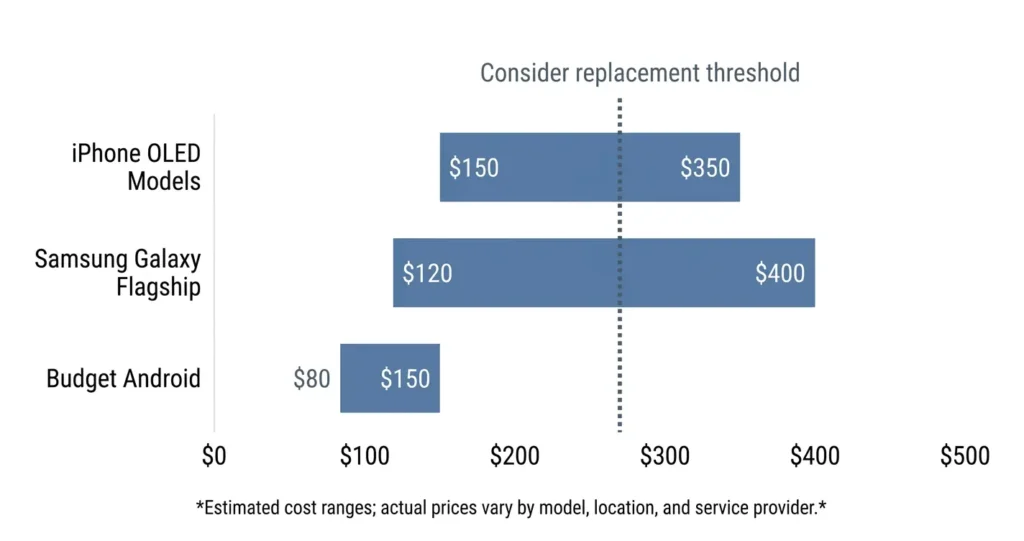
Screen repair quotes catch most people off guard, and the range is wide enough to make comparison shopping essential. A budget Android phone might cost $80 to fix. A current flagship can easily hit $300 to $400.
That gap isn’t random it tracks directly to screen technology, parts availability, and whether genuine manufacturer components are used or not
Screen replacement cost varies dramatically based on your phone model and where you get it fixed. Budget Android phones might cost $80 to repair, while flagship models can hit $300 or more. The decision point isn’t just the repair cost though. It’s whether your phone is worth investing that money into.
I use a simple rule. If the repair cost exceeds 60% of your phone’s current resale value, replacement makes more sense than repair. But there are exceptions when warranty coverage or specific circumstances change that calculation.
The key is getting accurate quotes and understanding what’s actually covered under your phone’s warranty before you decide. Many people pay for repairs that should have been free, or spend money fixing phones that aren’t worth the investment.
Here’s how to make the right financial decision.
Repair Cost Breakdown by Device Type
iPhone screen replacement cost runs between $150 and $350 depending on the model — older LCD iPhones are at the low end, current OLED models push toward the top. Independent repair shops typically charge 15–25% less than Apple’s own service, though Apple’s pricing has become more competitive on older models. Samsung Galaxy screen replacement cost covers a wider range: $120 on older mid-range models up to $400 or more on the current S-series flagships
Samsung Galaxy screen replacement cost ranges from $120 for older models to $400 for the latest flagship devices. Samsung’s own repair service costs more than third-party shops, but you get genuine parts and warranty protection.
Budget Android phones create a different problem. Screen replacement cost often exceeds the phone’s replacement value. A $200 phone with a $150 repair cost means you should probably just buy a new device instead.
The labor cost stays roughly the same regardless of phone value. That’s why expensive phones make more sense to repair while budget phones often don’t.
Check your phone’s current market value before getting quotes. If multiple repair shops quote similar prices that seem high, the problem might be parts availability rather than markup.
Before leaving any repair shop, confirm the warranty period on the work. Good shops guarantee their repairs for 30 to 90 days.
That window matters specifically for bright spots post-repair pressure spots sometimes take two to three weeks to appear as internal adhesive sets and components settle. A shop with no workmanship warranty is telling you something about how they operate
When to replace phone screen versus buying a new device depends on your phone’s age, overall condition, and how much longer you planned to keep it anyway.
Stop Making These Mistakes That Make Bright Spots Worse
The first 60 minutes after noticing a bright spot are when most people make it worse. Pressing on it is the most common mistake and the most damaging. Poking or squeezing the spot doesn’t redistribute anything.
It ruptures surrounding pixels and turns a localized problem into a spreading dead zone
The biggest mistake I see is pressing on the bright spot to try to push it back into place. Do not try to squeeze or press down on the black dot because this can rupture surrounding pixels and turn a small problem into phone screen physical damage that spreads across half your display.
I’ve had customers bring me phones where a tiny bright spot became a dead zone covering a quarter of the screen. All because they kept poking at it with their finger, thinking pressure would somehow reverse the damage.
The second mistake is following random YouTube repair hacks. Most of these videos show methods that work on old phone models but destroy modern screens. What worked on a 2018 phone with LCD technology can permanently damage a 2024 phone with OLED layers.
Heat tricks are particularly dangerous. Putting your phone in direct sunlight or using a hair dryer creates thermal expansion that can separate display layers permanently. Rice tricks don’t work either and waste time when urgent action might actually help.
Screen protector removal is the step I warn people about most often. Peeling too aggressively especially on a screen that already has a pressure weak point can create new compression zones. Lift one corner slowly, check for resistance, and stop if the display shows any distortion as you pull
If you need to remove your screen protector to check for damage underneath, lift one corner slowly and check for resistance.
Repeatedly opening white or bright backgrounds to test the spot is one of the less obvious mistakes. On OLED panels, the sustained brightness in that area can accelerate pixel degradation in the surrounding healthy pixels. Check it once to document it, then stop. Every unnecessary test shortens the useful life of the screen area around the damage
Stop trying to massage or flex your phone to redistribute whatever is causing the bright spot. Bending puts stress on internal connections that might still be working fine.
Most of these mistakes happen in the first hour. Frustration and urgency are a bad combination when the fix requires patience. The damage from bad DIY attempts is often worse than the original bright spot and it’s almost always irreversible
When Bright Spots Can’t Be Fixed (The Honest Truth)
Some bright spots are permanent. Not mostly permanent. Not fixable with the right app. Just done. On AMOLED and LED panels, once the physical pixel layer has failed, no software process reverses that. The organic compounds that create those pixels don’t recover. What you see is what remains.
The pixels are physically dead, and no app or restart sequence can bring dead hardware back to life.
This is the reality most repair guides won’t tell you directly. They keep offering solutions that might work for LCD screens or software glitches, but completely ignore the fact that modern flagship phones use display technology that fails differently.
Screen burn-in on OLED displays is permanent pixel damage full stop. When those organic pixels degrade from sustained overuse or a manufacturing defect, the affected area can no longer produce accurate color or brightness. You get a washed-out patch, a bright zone, or eventually a dead area. None of that comes back.
I see people waste weeks trying software solutions on phones where the hardware has already failed. The bright spot isn’t going to fade or respond to pixel repair apps because there’s nothing left to repair.
When to replace phone screen versus buying a new device depends on your phone’s age and overall condition. But if you’re dealing with spreading OLED degradation or multiple bright spots appearing over time, replacement often costs more than the phone is worth.
Not every problem has a fix. Modern phones are thin precisely because the components are packed in tightly, and that density means damage in one area cascades into others in ways that can’t be reversed.
At some point the decision shifts from repair to replacement and that’s fine. The 60% rule I mentioned earlier is where I’d start that calculation
Your phone served you well. Now it’s time to decide whether professional screen replacement makes financial sense or if upgrading to a new device is the smarter choice.
Frequently Asked Questions
Is the bright spot on my phone screen dangerous or will it spread?
OLED and AMOLED screens can develop spreading damage that gets worse over time, especially if you see flickering or color changes. LCD screens usually stay stable, but if battery swelling caused the bright spot, that’s an immediate safety concern that needs professional attention.
Can I use toothpaste or rice to fix a bright spot on my phone screen?
No, these home remedies are complete myths that can actually damage your screen further, especially on modern OLED displays. The question “why is there a bright spot on my phone screen” requires understanding the actual cause, not following random internet hacks that don’t work.
How much does it cost to fix a bright spot on a phone screen professionally?
Professional screen replacement typically costs between $150 and $400 depending on your phone model and screen technology. If the repair cost exceeds 60% of your phone’s current value, buying a replacement device usually makes more financial sense.
Why did a bright spot appear right after my phone screen was repaired?
Post-repair bright spots usually come from wrong screw sizes pushing against the display layers or leftover adhesive trapped behind the screen. Return to the repair shop immediately because this is an installation error they should fix for free under their workmanship warranty.
Is there free software that can fix stuck pixels causing bright spots?
JScreenFix is a free web tool that can help with true stuck pixels by cycling colors rapidly over the affected area. However, it won’t fix hardware damage like pressure spots or physical screen layer problems that cause most bright spots.